6 Pain-Free Posture Tips from a Johns Hopkins Professor (And Why the Aeron Chair Matters)
Expert ergonomic advice to reduce back pain and improve sitting posture at work
By the Furniblog Editorial Team·July 14, 2026·4 min read

How Many Hours a Day Do You Spend Sitting?
For office workers who spend most of their day seated, sitting posture directly impacts health. Even the best ergonomic chair can cause pain if you're sitting incorrectly.
Jacqueline Agnew, a professor at the Johns Hopkins Bloomberg School of Public Health, has outlined six practical posture strategies to help professionals avoid pain caused by prolonged sitting. Her research-backed advice addresses common problems affecting the spine, lower back, and discs.

Six Steps to Pain-Free Work Habits
These recommendations come from Johns Hopkins University's official ergonomics guidance and focus on sustainable habits anyone can adopt.
1. Position Your Monitor at Eye Level
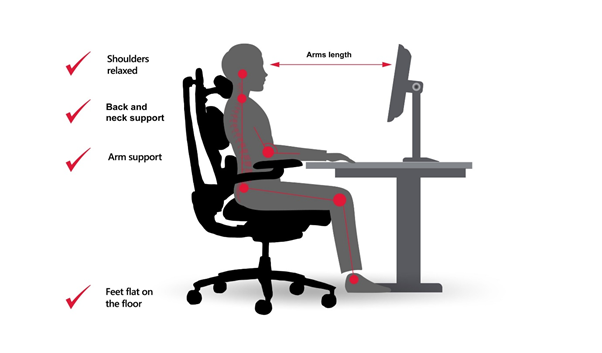
"The center of your screen should be slightly below your eyes," Agnew advises. Adjusting your monitor this way reduces unnecessary strain on your neck and shoulders, which often leads to tension headaches and upper back discomfort.
2. Keep Your Feet Flat and Hips Higher Than Knees
"Your feet should be flat on the floor, and your hips slightly higher than your knees." This slight downward angle of the thighs reduces pressure transmitted to the lumbar spine and encourages better pelvic alignment.
3. Support Your Lumbar Curve
"Support the natural curve in your lower back with the back of your chair or a cushion." Maintaining the natural inward curve of the lower spine—known as lumbar lordosis—is essential for healthy sitting posture. Without proper lumbar support, the spine tends to slouch into a C-shape, increasing disc pressure.
4. Minimize Reaching—Adjust Keyboard and Mouse Placement
"Avoid reaching too far for the keyboard or mouse." Overextending your arms puts strain on the elbows, wrists, and shoulders. Keep frequently used items within easy reach to maintain a neutral arm position.
5. Take Breaks Every 30–60 Minutes
"Take short breaks every 30 to 60 minutes." Static sitting increases load on spinal discs. Standing, stretching, or walking briefly each hour helps relieve built-up tension and improves circulation.
6. Recognize and Manage Stress
"People will have pain and numbness at night and not realize it's because of their actions during the day," Agnew notes. Small repetitive habits during work hours—like shoulder tensing or jaw clenching—can lead to evening discomfort. Being aware of stress-related muscle tension is a critical part of posture health.
Why Lumbar Support Is Non-Negotiable
Among Agnew's six recommendations, lumbar support stands out as particularly crucial. The lower back bears much of the body's weight while seated, and without proper support, discs and vertebrae experience uneven stress that can lead to chronic pain.
This is why many orthopedic specialists and physical therapists consistently recommend chairs designed with advanced lumbar systems—and why the Herman Miller Aeron is so frequently mentioned in clinical and ergonomic contexts.
What Makes the Aeron Chair Different?
PostureFit SL Support System
The Aeron's PostureFit SL doesn't just push against your lower back. It's designed to support both the lumbar curve and the base of the pelvis simultaneously, stabilizing pelvic tilt and maintaining the spine's natural S-curve. This dual-zone approach aligns closely with Agnew's emphasis on supporting lumbar lordosis.
Three Size Options for True Fit
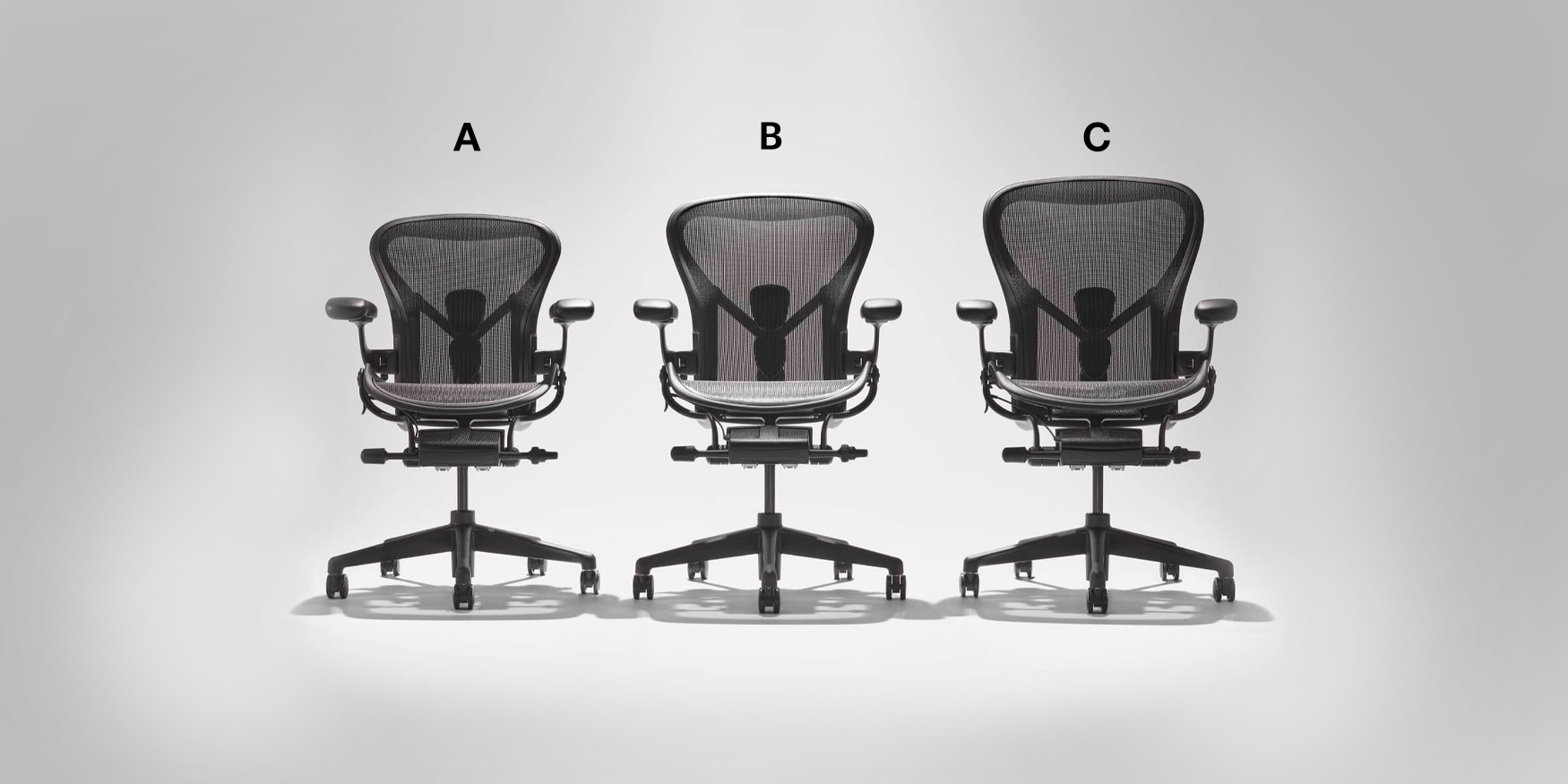
The Aeron comes in sizes A, B, and C to accommodate different body types, heights, and weights. Proper ergonomic support only works when the chair's backrest curve aligns with your own spine—one size does not fit all. This sizing system allows the chair to match each user's lumbar position accurately.
Developed with Clinical Input
Herman Miller's design process involved collaboration with physicians, physical therapists, and rehabilitation experts. The Aeron reflects thousands of hours of clinical feedback, making it a frequent choice in medical offices, therapy centers, and workplaces serious about injury prevention.
The Importance of Trying Before Buying
Even a highly regarded chair like the Aeron won't be right for everyone. If you have existing conditions such as herniated discs, scoliosis, or chronic lower back pain, an improperly fitted lumbar support can sometimes create additional pressure rather than relief.
Because the Aeron is available in three sizes with varying seat depths, backrest heights, and lumbar pad positions, it's essential to sit in the chair and assess comfort with professional guidance. What works for a 5'4" user will differ significantly from what a 6'2" user needs.
Other Chairs with Strong Lumbar Support
While the Aeron is a standout, it's not the only chair designed with serious lumbar architecture. Consider these alternatives if you're exploring ergonomic seating:
Steelcase Leap V2 – Features LiveBack technology that changes shape as you recline, keeping lumbar support consistent.
Herman Miller Embody – Offers backfit adjustment that conforms to your spine's micro-movements.
Steelcase Gesture – Designed for users who shift postures frequently, with a flexible spine-like back.
Haworth Fern – Provides adjustable lumbar support with wave suspension for breathability.
Humanscale Freedom – Automatically adjusts recline tension and includes a self-adjusting lumbar pad.
Final Takeaway: Posture Starts with Habit, Not Just Equipment
Professor Agnew's six-step framework reminds us that good posture is a practice, not a product. Even the most advanced ergonomic chair can't compensate for poor monitor height, static sitting, or unchecked stress.
That said, the right chair makes good posture easier to maintain. Lumbar support, adjustable armrests, seat depth, and tilt functionality all contribute to reducing strain and supporting healthy alignment throughout the workday.
If you're serious about preventing back pain and improving your work setup, start with Agnew's six habits—and invest time in finding a chair that truly fits your body.
Furniblog may earn a commission from links in this post, at no extra cost to you. See our affiliate disclosure.