How to Use the Herman Miller Aeron: A Complete Control Guide
Master every adjustment on the iconic ergonomic chair with this step-by-step guide
By the Furniblog Editorial Team·July 10, 2026·4 min read
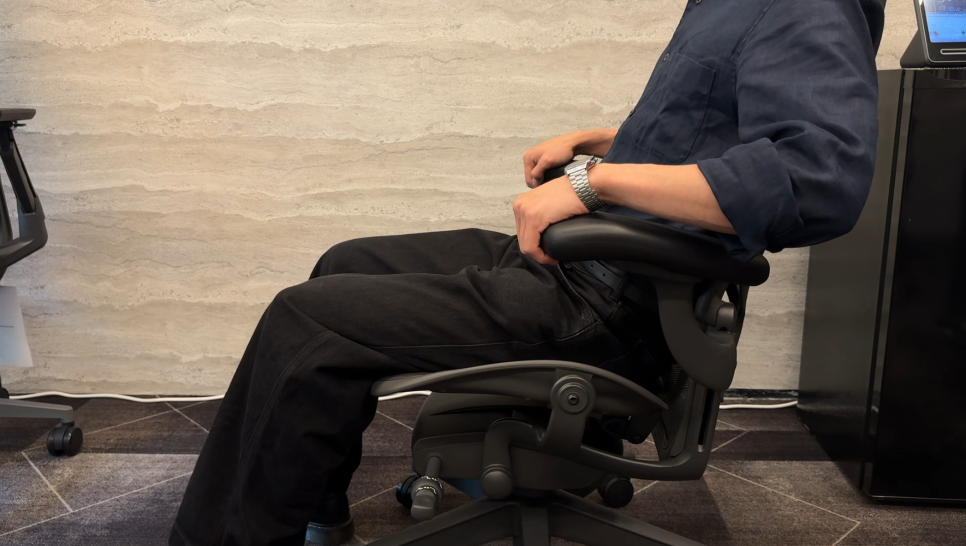
The Herman Miller Aeron is one of the most celebrated ergonomic chairs ever made—but it's also one of the most misunderstood. With multiple levers, knobs, and adjustments scattered around the chair, many first-time users find themselves overwhelmed by the sheer number of controls.
If you've ever sat in an Aeron and wondered what all those levers actually do, you're not alone. This guide will walk you through every adjustment on the Aeron (specifically the newer Aeron Remastered model) so you can dial in the perfect ergonomic setup for your body.
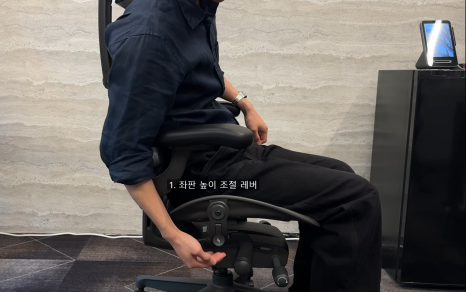
1. Adjusting Seat Height
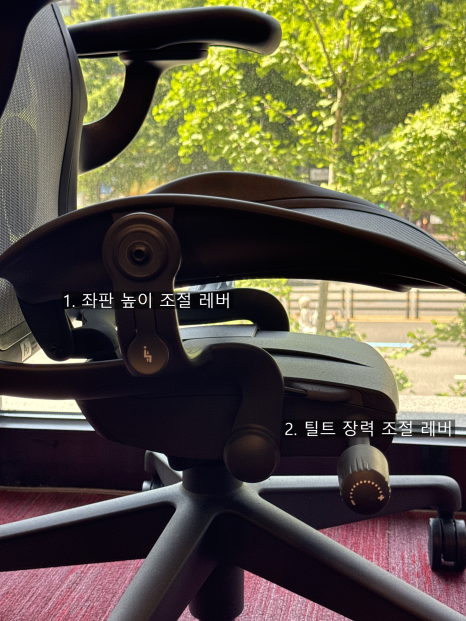
The seat height lever is located on the right side of the chair, shaped like a paddle.
To raise the seat: Stand up and pull the lever upward while the seat is unweighted.
To lower the seat: Sit down and pull the lever upward; the seat will descend under your weight.
Your goal is to adjust the seat so your feet rest flat on the floor and your thighs are roughly parallel to the ground, with your knees at about a 90-degree angle.
2. Adjusting Tilt Tension
The tilt tension knob is also on the right side of the chair, below the seat.
To increase tension: Turn the knob clockwise (toward the + symbol).
To decrease tension: Turn the knob counterclockwise (toward the – symbol).
Adjust the tension so that when you recline, the chair offers gentle resistance that matches your body weight—not too stiff, not too loose.
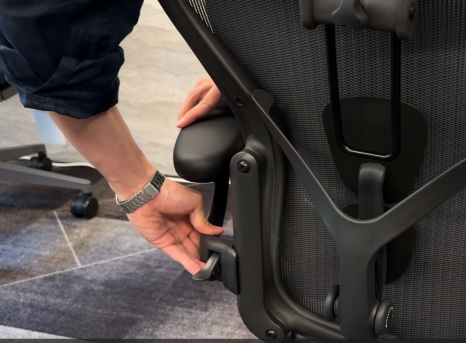
3. Adjusting Arm Height
The arm height lever is located on the underside of each armrest, near the support column at the back.
Important tip: Don't grab the armpad itself when adjusting height—it won't budge easily. Instead, hold the armrest by its base (closer to the seat), then pull up or push down firmly. The arm will move smoothly once you apply pressure at the right spot.
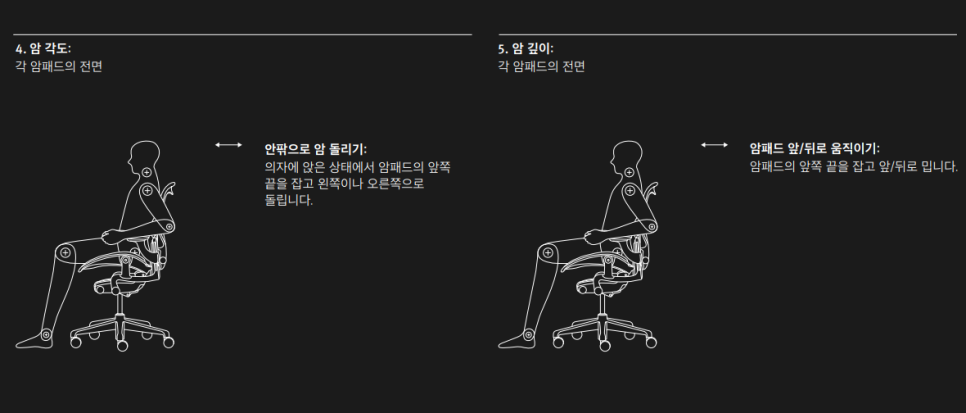
4. Adjusting Armrest Angle and Depth
The Aeron's armrests are highly versatile:
Angle adjustment: The armpads pivot inward and outward to match the natural angle of your arms.
Depth adjustment: The armpads slide forward and backward, so you can position support exactly where your forearms rest.
These adjustments are typically friction-based—just grip the armpad and gently push or rotate it into position.
5. Adjusting PostureFit SL (Lumbar Support)
The Aeron Remastered features the PostureFit SL system, which supports both your lower back and sacrum. Unlike older lumbar systems, PostureFit SL does not adjust for height—it only adjusts tension.
You'll find two small knobs at the back of the chair, just above the seat:
Turn the knobs to increase or decrease the forward pressure against your lumbar region and pelvis.
Adjust until you feel firm, comfortable support that encourages you to sit upright without feeling pushed forward.
6. Tilt Recline and Tilt Lock
This is where many users get confused. On the left side of the chair, you'll find two levers close together. The inner lever (closer to the seat) is the tilt control.
Unlocked position: The chair reclines freely when you lean back.
First lock: Pull the lever up one click to lock the chair in a slightly reclined position.
Second lock: Pull the lever up another click to lock the chair fully upright.
Most people use the chair in the unlocked (free-float) mode for dynamic sitting, locking it only when they need a stable position for focused work.
7. Forward Tilt (Advanced Feature)
The outer lever on the left side controls the forward tilt feature—a less common adjustment that tilts the seat pan slightly forward.
How to activate forward tilt:
Lean back in the chair to shift your weight off the front of the seat.
Engage the forward tilt lever (the outer one on the left).
Shift your weight forward; the seat will tilt downward slightly.
Use the tilt lock lever (the inner lever) to lock the forward tilt in place.
Note: Forward tilt will not engage if your weight is centered or forward on the seat. You must lean back first.
Forward tilt is useful for tasks that require you to lean forward—drafting, detailed handiwork, or certain keyboard positions—but most users will keep this feature off for everyday computing.
Final Thoughts
The Herman Miller Aeron may seem complicated at first, but once you understand where each control is and what it does, you'll appreciate the depth of customization it offers. Take 10–15 minutes to experiment with each adjustment, and don't be afraid to tweak settings throughout the day as your posture and tasks change.
If you're considering an Aeron or want to compare it with other flagship ergonomic chairs, check out our reviews of the Steelcase Leap V2, Steelcase Gesture, and Herman Miller Embody.

Furniblog may earn a commission from links in this post, at no extra cost to you. See our affiliate disclosure.