How to Use Your Headrest to Beat Forward Head Posture
The overlooked chair adjustment that can protect your neck and spine
By the Furniblog Editorial Team·July 7, 2026·6 min read
Forward head posture has become one of the most common complaints among office workers, students, and anyone who spends hours each day looking at screens. Neck stiffness, shoulder pain, and persistent headaches are now routine for millions of people worldwide. While many turn to stretching routines or monitor stands for relief, there's one piece of equipment that's often completely ignored: the headrest on your office chair.
Today we'll explore how a properly adjusted headrest can be one of your most powerful tools for protecting cervical spine health and escaping the forward head posture trap.
Why Your Chair Matters: The Hidden Weight on Your Neck
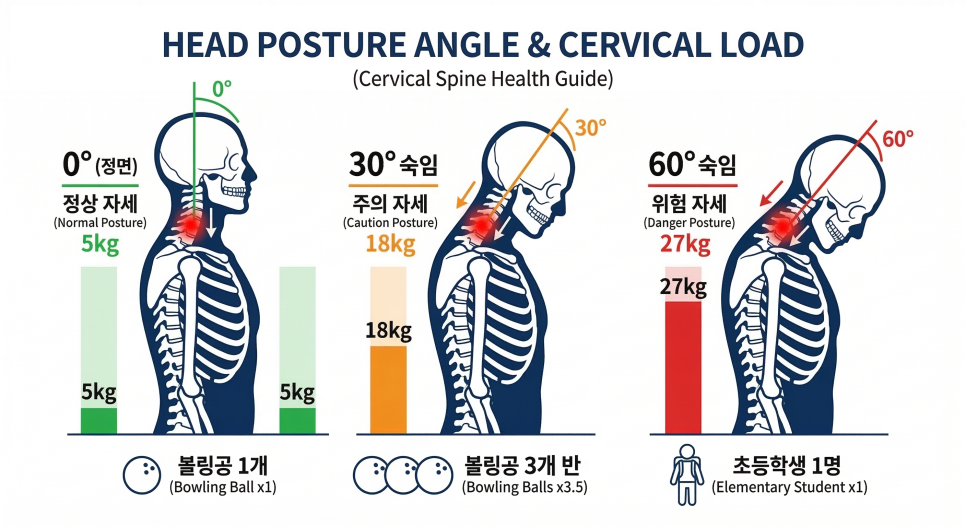
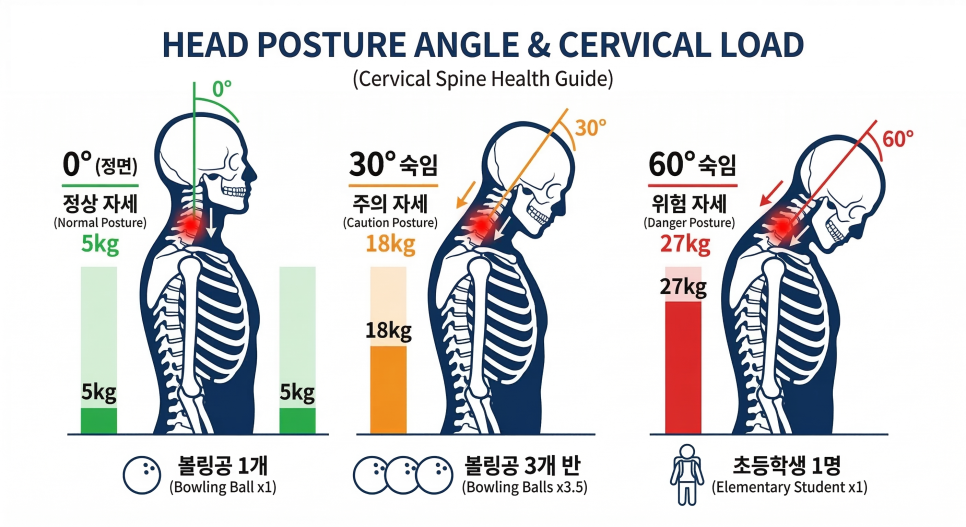
The average adult head weighs between 10 and 12 pounds—roughly the weight of a bowling ball balanced on top of your spine. Under normal circumstances, your cervical spine forms a natural C-shaped curve that efficiently distributes this weight. But as you lean forward to focus on your work, the load on your neck increases dramatically.
Research by Dr. Kenneth Hansraj, a New York spine surgeon, revealed striking numbers: when you tilt your head forward just 15 degrees, the effective weight on your cervical spine jumps to about 27 pounds. At 30 degrees, it climbs to 40 pounds. And at a 60-degree angle—common when looking down at a phone or poorly positioned monitor—your neck bears nearly 60 pounds of pressure.
This excessive loading causes the muscles around your neck to become chronically tense. Over time, the alignment of your cervical vertebrae changes, and forward head posture becomes the new normal.
The Headrest Is Not Just a Pillow
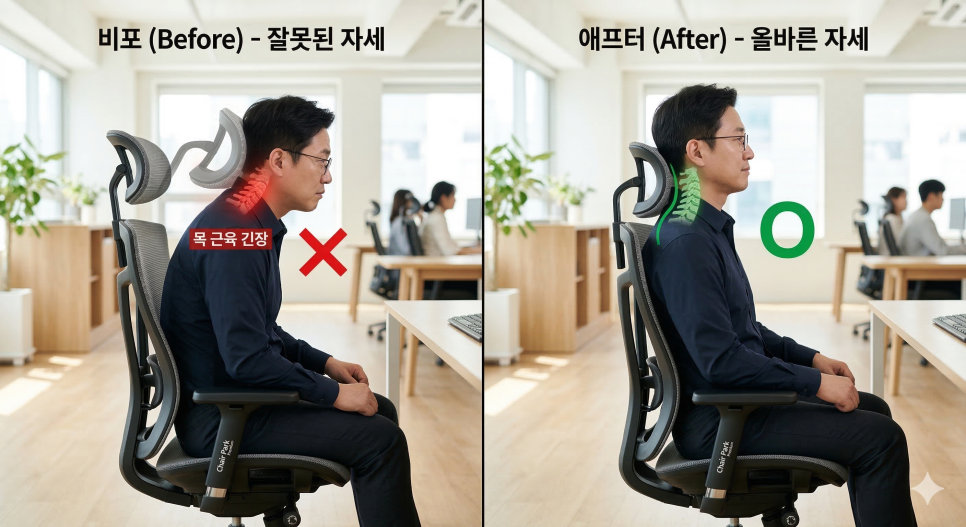
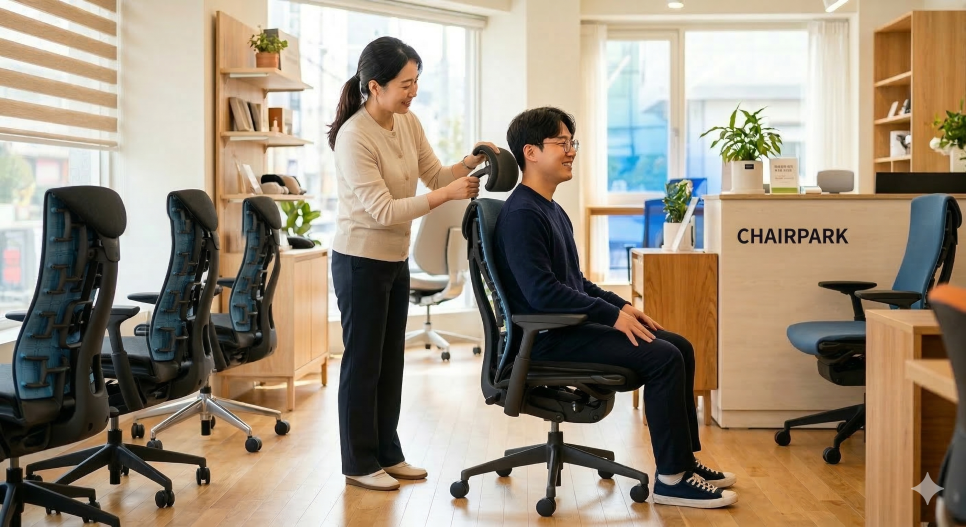
A properly positioned headrest doesn't simply give you a place to rest during breaks. Its primary biomechanical function is to transfer the weight of your head to the chair's frame, reducing the load your neck muscles must bear. When your headrest is missing or poorly adjusted, your neck spends the entire workday supporting that 10-to-12-pound head on its own—and slowly breaking down in the process.
Adjusting Headrest Height: Find Your Cervical Curve
One of the most common mistakes is positioning the headrest against the back of the skull. If the headrest is too high and pushes against the upper part of your head, it can actually tilt your head downward and promote forward head posture. If it's too low, it will press into your upper trapezius muscles and increase shoulder fatigue.
How to Set the Correct Height
Sit all the way back: Push your hips fully into the seat pan and your back against the backrest.
Locate your cervical curve: Reach back and feel the base of your skull. Just below it, you'll find a slightly concave area where your neck curves inward. This is the center of your cervical lordosis.
Align the headrest: Adjust the headrest so that its most prominent (protruding) part contacts this concave point at the base of your skull. When positioned here, the headrest can naturally support your head's weight and allow your neck muscles to relax.
Adjusting Headrest Angle: Align Your Gaze and Chin
Once height is dialed in, the next step is angle. According to ergonomic standards from OSHA and ANSI/HFES, the position of your chin and the direction of your gaze have significant impacts on neck muscle tension. Many premium ergonomic chairs now offer headrests with adjustable tilt, allowing fine-tuning beyond simple height.
Finding the Optimal Angle
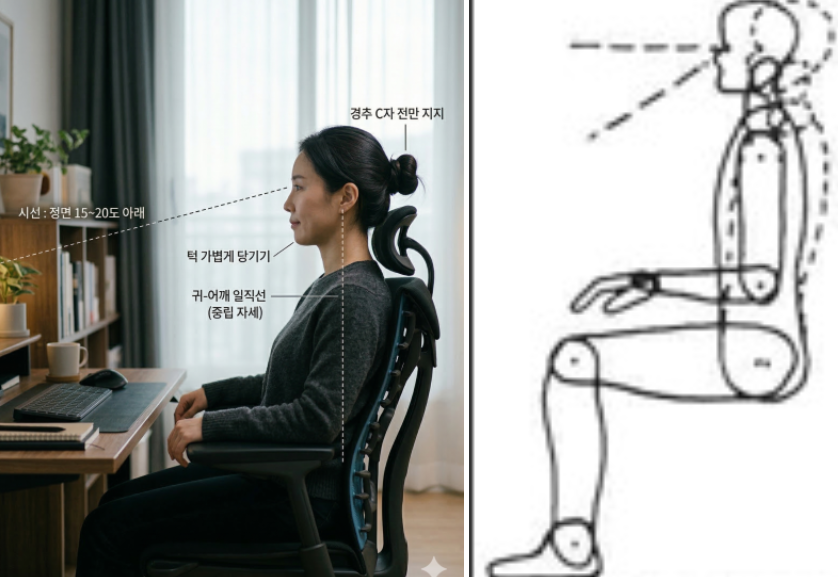
Maintain a neutral position: When you gently tuck your chin toward your chest, the back of your head should lightly contact the headrest. You should not need to push your head backward.
Set your sightline: Your monitor should be positioned so your gaze is roughly 15 to 20 degrees below horizontal. Adjust the headrest angle so it supports this posture. If the headrest tilts too far forward, it can force your head into a forward position.
Check for pressure points: When you rest your head, your neck muscles should feel relaxed, almost as if your head is floating. If you feel pressure on any specific area, tilt the headrest back slightly to distribute the load more evenly.
Three Ways a Properly Adjusted Headrest Protects Your Health
1. Prevents Myofascial Pain Syndrome
The muscles at the junction of your neck and shoulders—including the splenius and trapezius—are prone to chronic tightness when unsupported. Relieving tension in these muscles can also reduce associated symptoms like chronic headaches and eye strain.
2. Reduces Disc Pressure
The intervertebral discs in your cervical spine are highly sensitive to vertical compression. Classic research by Dr. Alf Nachemson showed that reclining postures with proper head support significantly reduce intradiscal pressure, slowing degenerative changes and lowering the risk of cervical disc herniation.
3. Completes Spinal Alignment
Your spine is one continuous structure. When your neck is properly aligned, your thoracic and lumbar spine tend to follow suit. Correcting your posture starts at the top—with your cervical spine—and the headrest is the anchor point.
Additional Tips to Prevent Forward Head Posture
Even with a perfectly adjusted headrest, staying in any fixed position for too long can stress your body. Here are a few habits to maximize your chair's ergonomic benefits:
Use the recline function: After focused work sessions, lean back and fully rest your head on the headrest for one to two minutes. This resets your cervical alignment.
Coordinate armrest height: If your armrests are too low, your shoulders will sag and pull your neck downward. Set armrests at elbow height to keep your shoulders relaxed and enhance the headrest's effectiveness.
Invest in a monitor arm: Once your chair is dialed in, adjust your monitor to match. The top third of your screen should be at eye level. If your monitor is too low or too far away, you'll unconsciously lean forward and lose contact with the headrest.
Your Sitting Posture Is an Investment
We spend more time sitting than doing almost any other single activity. Choosing the right chair and learning to use it properly is not a luxury—it's one of the most proactive investments you can make in your long-term spinal health.
If you're reading this now, take a moment to reach back and check your headrest. Is it too low? Too high? Is it pressing into the wrong part of your head or neck? A one-minute adjustment today could spare you years of discomfort.
Chairs like the Herman Miller Aeron, Steelcase Gesture, and Humanscale Freedom all offer highly adjustable headrests designed to support proper cervical alignment. If your current chair lacks this feature, it may be time to upgrade.
Forward head posture doesn't have to be your reality. With the right setup and a little attention to detail, you can enjoy a healthier, more comfortable work life—starting with your headrest.
Furniblog may earn a commission from links in this post, at no extra cost to you. See our affiliate disclosure.