The Complete Guide to Ergonomic Desk Setup: Monitor, Chair, and Desk Height
Optimize your workspace for comfort, health, and productivity
By the Furniblog Editorial Team·August 3, 2026·4 min read
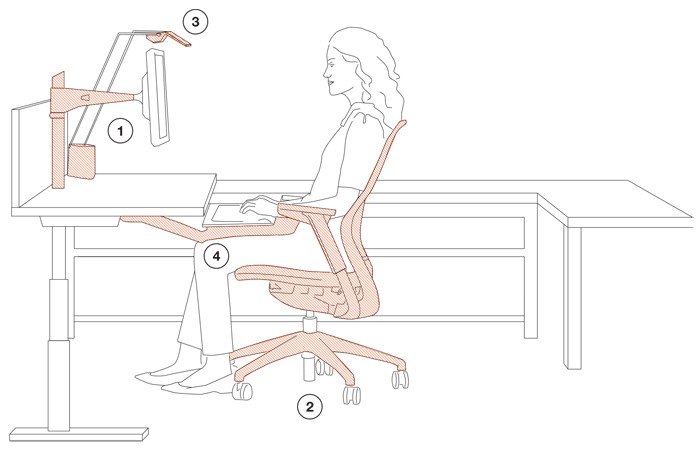
Research consistently shows that workplace ergonomics is a critical factor in employee performance, job satisfaction, and ultimately, retention. Yet many of us spend eight or more hours a day hunched over poorly configured workstations, inviting discomfort, fatigue, and long-term injury.
The modern workspace must be flexible and adaptable, supporting various work modes and seamless transitions between tasks. By providing yourself—or your team—with an ergonomically sound workspace, you're investing in wellbeing and sustainable productivity. The following tips will help you configure your workstation to promote comfort and enhance performance.
1. Monitor Placement and Arm Position
Your monitor should be positioned directly in front of you, centered horizontally with your seated position. This eliminates the need for constant neck rotation, a common cause of strain.
Height: Your eyes should be level with or slightly below the top edge of the screen. The top line of text should sit just below eye level, allowing your gaze to angle slightly downward—the natural resting position for your eyes.
Distance: Position the monitor roughly an arm's length away (approximately 20 to 30 inches). If you find yourself leaning forward to read text, increase font size rather than moving closer.
Angle: The screen should be perpendicular to your line of sight, tilted back 10 to 20 degrees to minimize glare and maintain a comfortable viewing angle.
2. Office Chair Setup
Your chair is the foundation of ergonomic seating. Even the best ergonomic chair won't help if it's not adjusted correctly.
Backrest: Always sit fully back in the chair so your lower back is supported by the lumbar support. Your spine should maintain its natural S-curve.
Seat height: Adjust so your thighs are parallel to the floor and your feet rest flat on the ground. Your knees should be at approximately a 90-degree angle, or slightly greater.
Seat depth: There should be a gap of about two to four fingers' width between the back of your knees and the front edge of the seat. This prevents pressure on the back of your thighs and supports healthy circulation.
Armrests: Set armrests so your elbows rest comfortably at your sides, forearms roughly parallel to the floor.
Investing in a quality ergonomic chair pays dividends. Models like the Steelcase Gesture, Herman Miller Aeron, and Haworth Fern offer a high degree of adjustability to fit a wide range of body types and work styles.
3. Desk and Keyboard Height
Proper desk and keyboard height is essential to avoid shoulder, wrist, and neck strain.
Keyboard position: Your keyboard tray or desk surface should be at or just below elbow height when your arms are relaxed at your sides. This allows your forearms to remain roughly parallel to the floor while typing.
Shoulder and elbow position: Keep your shoulders relaxed—not hunched or elevated—and elbows close to your body, bent at about 90 to 110 degrees.
Mouse placement: Your mouse should be within the span of your shoulders, close to the keyboard, so you're not reaching or twisting to use it.
Wrist posture: Keep wrists in a neutral position (not bent up, down, or to the side). Consider a wrist rest for support during breaks, but avoid resting your wrists while actively typing.
4. Task Lighting
Good lighting reduces eye strain and headaches, yet it's often overlooked in workspace setup.
Position: Place your task light to the side of your monitor, not directly behind it or in front of you, to minimize glare and reflections on the screen.
Brightness: Choose lighting levels appropriate to your task. Detailed work like reading printed documents may require brighter, focused light, while computer work generally benefits from softer, ambient lighting.
Color temperature: Daylight-balanced bulbs (5000K to 6500K) can reduce eye fatigue, though warmer tones (3000K to 4000K) may feel more comfortable for extended periods.
Putting It All Together
Ergonomics is not one-size-fits-all. While these guidelines provide a solid starting point, the best setup is one tailored to your body, your tasks, and your preferences. Pay attention to discomfort—it's often an early warning sign that something needs adjustment.
Take regular breaks to stand, stretch, and move. Even the most perfect ergonomic setup can't fully counteract the effects of prolonged static posture. Consider integrating a sit-stand desk or simply setting a timer to remind yourself to change positions throughout the day.
If possible, test chairs and desks in person before purchasing. Showrooms and retailers offer the opportunity to sit, adjust, and compare—helping you find the setup that truly fits. Your workspace is where you'll spend a significant portion of your life. It's worth getting it right.

Furniblog may earn a commission from links in this post, at no extra cost to you. See our affiliate disclosure.