Why People Who Sit 8 Hours a Day Regret Buying a Gaming Chair
Ergonomic features don't guarantee ergonomic fit—what to check before you buy
By the Furniblog Editorial Team·July 10, 2026·6 min read
Gaming Chairs Have Ergonomic Features—So Why the Problems?
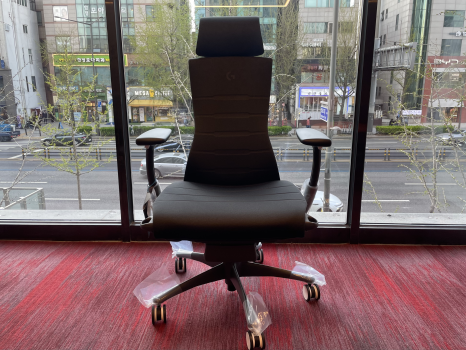
Let's clear up a common misconception right away: gaming chairs do incorporate ergonomic design. Models like the Razer Iskur feature adjustable lumbar support, and the Herman Miller x Logitech G Embody Gaming Chair offers spine-centered alignment and pixelated pressure distribution.
But here's the key distinction: a gaming chair is not automatically an ergonomic chair. More importantly, just because a product lists "ergonomic features" doesn't mean those features will fit your body.
Most gaming chairs today include lumbar cushions, height adjustment, armrest controls, recline, and headrests. That's all true. The issue arises with the racing bucket seat design—those chairs with prominent side bolsters and thick foam cushions that look dramatic in streamer setups but often fail to support the human body during extended office or study sessions.
The Structural Limits of Racing Bucket Seats
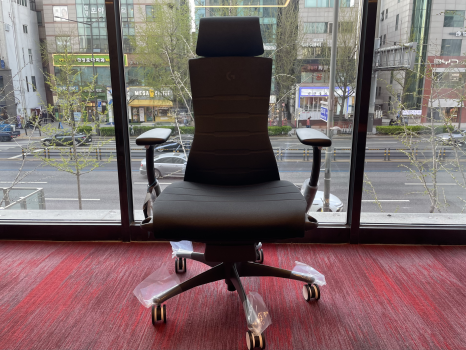
Bucket seats were originally designed for high-speed cornering in motorsports—they hold the body firmly in place during short bursts of performance, not for all-day comfort. When transplanted into office environments, three problems emerge:
1. Side Bolsters Push Your Shoulders Forward
The winged side bolsters restrict natural shoulder width, forcing your upper body into a closed, hunched position. Over time, this promotes rounded shoulders and upper back strain.
2. Lumbar Cushions Are Often Misplaced
Effective lumbar support needs to target the L3–L4 vertebrae. Many gaming chair cushions sit too high or too low, and if they're fixed in place, they can't adapt to different body types. A cushion in the wrong spot creates discomfort rather than relief.
3. Limited Fine-Tuning of Tilt Tension and Seat Depth
Many budget and mid-range gaming chairs lack adjustable tilt tension or seat depth (slide). If the tilt mechanism doesn't match your body weight, it will either push you forward or let you collapse backward. Both are bad for your lumbar spine.
⚠ Critical for Disc Issues: If you have a herniated disc or chronic lower back pain, what matters isn't cushion softness—it's whether the lumbar support hits the right spot, whether seat depth adjusts to your thigh length, and whether tilt tension can be tuned to your weight and posture.
What to Actually Check Before You Buy
Whether you're considering a gaming chair or a dedicated ergonomic task chair, these criteria apply universally. If a chair doesn't meet them, it's not suitable for 6+ hour daily sitting.
Feature | Why It Matters | How to Verify |
|---|---|---|
Adjustable Lumbar Support Position | Fixed cushions rarely align with your L3–L4. Height adjustment is essential. | Check for vertical adjustment mechanism |
Seat Depth (Slide) Adjustment | If the seat pan presses into the back of your knees, circulation suffers. | Look for front-to-back seat pan slider |
Tilt Tension Control | Tension that doesn't match your weight forces poor posture. | Confirm presence of tension dial or knob |
3D or 4D Armrests | Shoulder width and task type vary. Fixed armrests create shoulder tension. | Test height, angle, and depth adjustments |
Breathable Seat Material | Dense PU foam traps heat and pressure. Mesh or advanced foam improves comfort. | Check material specs or try in person |
Chairs Actually Built for 8+ Hour Sitting
The following models are designed from the ground up to support long work sessions without compromising posture. None of them is a one-size-fits-all "answer," but all share a foundation of body-adaptive engineering and proven track records.
Global Ergonomic Standards
Herman Miller Aeron
The 30-year benchmark for mesh ergonomic seating. PostureFit SL supports both the sacrum and lumbar spine simultaneously. A staple in Silicon Valley offices and remote work setups alike.
Herman Miller x Logitech G Embody Gaming Chair
A gaming-focused version of the acclaimed Embody, co-developed with Logitech G. Features Pixelated Support for pressure distribution and spine-centered design. The best choice for users who game and work long hours in the same chair.
Okamura Contessa II
Japanese precision engineering with an auto-adjusting backrest and a striking design by Giorgetto Giugiaro (famed Ferrari designer). Offers smart synchro-tilt and a control panel built into the armrest for effortless adjustment.
Under-the-Radar Ergonomic Champions
Itoki ACT2
A standout from Japanese office furniture leader Itoki. The 3D Smart Operation backrest adapts automatically to your body shape—no manual tweaking required. Wide seat depth adjustment accommodates long legs comfortably.
Kokuyo Ing Cloud
Built on the principle that static sitting harms the spine. The seat gently oscillates 360 degrees, keeping core muscles subtly engaged and circulation active. Users report significantly less stiffness after long sessions.
Generation by Knoll
Rejects the idea of a single "correct" posture. The elastic backrest (Centric Back) flexibly supports forward leans, side angles, and reclined positions. Ideal for developers, designers, and traders who shift postures throughout the day.

Key Differences Between Three Top Recommendations
Itoki ACT2: For Automatic Fit
Best if you want the chair to adapt to you without fiddling with levers. The 3D backrest contours to your spine as soon as you sit. Users consistently describe a "wrap-around" feel across the entire back.
Kokuyo Ing Cloud: For Active Sitting
Best if prolonged sitting makes your lower back feel stiff or numb. The micro-movement design keeps your lumbar muscles lightly active, improving circulation and reducing the "locked-up" sensation after hours at the desk.
Knoll Generation: For Postural Freedom
Best if you work in multiple positions—leaning forward to code, tilting back to review, shifting sideways during calls. The flex-back accommodates every posture naturally, without forcing you into a rigid "ideal" position.
The Bottom Line: It's Not About the Name, It's About the Specs
Gaming chairs aren't inherently bad. A well-equipped gaming chair with real lumbar height adjustment, seat depth control, and tunable tilt tension can absolutely work for long sessions—Herman Miller's Embody Gaming proves that.
The problem is that many racing-style gaming chairs prioritize aesthetics over biomechanics. If you sit more than 6 hours a day—especially if you have existing back issues—look past the branding and evaluate the actual adjustment capabilities.
Quick Reference by User Type
Remote workers, freelancers (6+ hrs/day): Lumbar adjustment + seat depth slider essential
Developers, designers, long monitor work: Add 3D armrest adjustment to the above
Day traders, multi-monitor setups: Tilt tension control + forward tilt option
Herniated disc or chronic pain: Lumbar position + seat depth are non-negotiable
Casual gamers (2–3 hrs/day): Design-focused gaming chairs are fine
Teens and young adults: Forming good sitting habits now pays dividends later
Pre-Purchase Checklist
Does lumbar support adjust vertically? ✓ / ✗
Does the seat pan slide forward and back? ✓ / ✗
Can you adjust tilt tension? ✓ / ✗
Do armrests move in at least 3 directions? ✓ / ✗
If you checked two or fewer boxes, reconsider that chair for long-sitting use.
Whether you're gaming or working, the real question isn't whether the chair is marketed as "gaming" or "ergonomic." It's whether the chair supports your body accurately, consistently, and adjustably. Choose a chair that keeps your spine aligned after eight hours, not one that just looks good in a setup photo.

Furniblog may earn a commission from links in this post, at no extra cost to you. See our affiliate disclosure.